zkLogin
ript.fi can create a Sui wallet from your Google account. You do not need a browser-extension wallet to trade or launch.
Sign in with Google
Open ript.fi and click Connect.
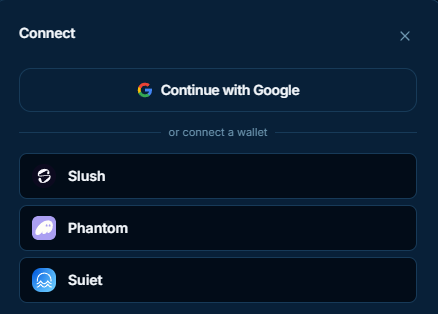
- Choose Continue with Google.
- Complete Google sign-in in the popup.
- The app shows Signed in with Google and a Sui address derived from that Google account.
You can still connect an installed wallet (Slush, Phantom, Suiet) from the same dialog.
INFO
Allow pop-ups for ript.fi. Google sign-in opens a separate window.
That address holds SUI and tokens like any other Sui wallet. Transactions are confirmed in the app — there is no extension popup. Swaps skip that confirm if One-click swap is on.
Fund the wallet
A new Google wallet starts empty. To trade or launch, add funds from Portfolio.
- Open Portfolio.
- Click Receive.
- Choose On Sui or From other chains.

On Sui
Copy the address and send SUI or any Sui coin from another Sui wallet or centralized exchange.
From other chains
Swap tokens from another chain into this wallet. Destination is always the connected Google wallet on Sui.
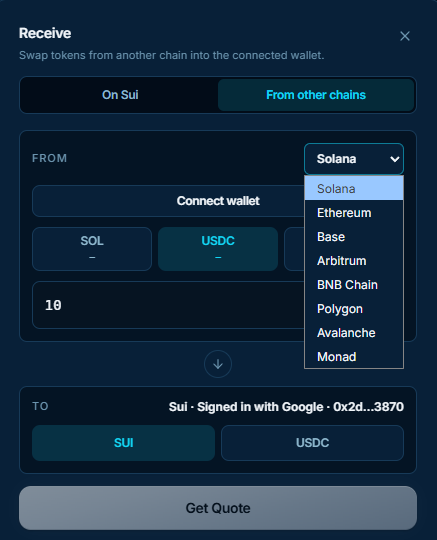
- Select the source chain (Solana, Ethereum, Base, Arbitrum, BNB Chain, Polygon, Avalanche, or Monad).
- Connect that chain's wallet.
- Pick the token and amount.
- Choose SUI or USDC as what you receive.
- Click Get Quote, then send from the source wallet.
When the swap completes, the tokens appear in Portfolio.
Trade and send
The Google wallet can trade and move any Sui token — not only ript.fi launches.
- Swap — open Swap to trade Sui tokens against each other.
- Send → On Sui — from Portfolio, click Send, keep On Sui, and pay another Sui address.
- Send → To other chains — same Send dialog, then To other chains. Swap SUI or USDC out to a wallet on Solana, Ethereum, Base, Arbitrum, BNB Chain, Polygon, Avalanche, or Monad.
Turn on One-click swap to send trades without the in-app confirm. The swap is signed as soon as you click the swap button. Sends and token launches still ask you to confirm.